Quick answer: Use WhatsApp Contact Export by installing WAContact in Chrome and opening WhatsApp Web. In Contact Export, choose the file format, contact source and filters you need, then select Export Contacts. WAContact creates the file locally in the browser extension workflow.
WhatsApp Contact Export turns names and phone numbers available in WhatsApp Web into a file that can be filtered, handed off or imported into a compatible application. Before starting, decide which contacts you need and whether the result is intended for spreadsheet work, a compatible business tool or a contact application.
This guide follows the current WAContact interface step by step. It explains each setting, the fields available from each source and the practical output differences between Excel, CSV and VCard.
What you need before you start
- A desktop version of Google Chrome with WAContact installed.
- The WhatsApp account you need signed in at WhatsApp Web.
- A clear destination for the file: spreadsheet organization, processing in a compatible business tool or import into an application that supports VCF.
After installation, open Chrome's Extensions menu and pin WAContact to the toolbar. Open WhatsApp Web, wait for the contacts and chats you need to finish loading, and keep the page open during export.
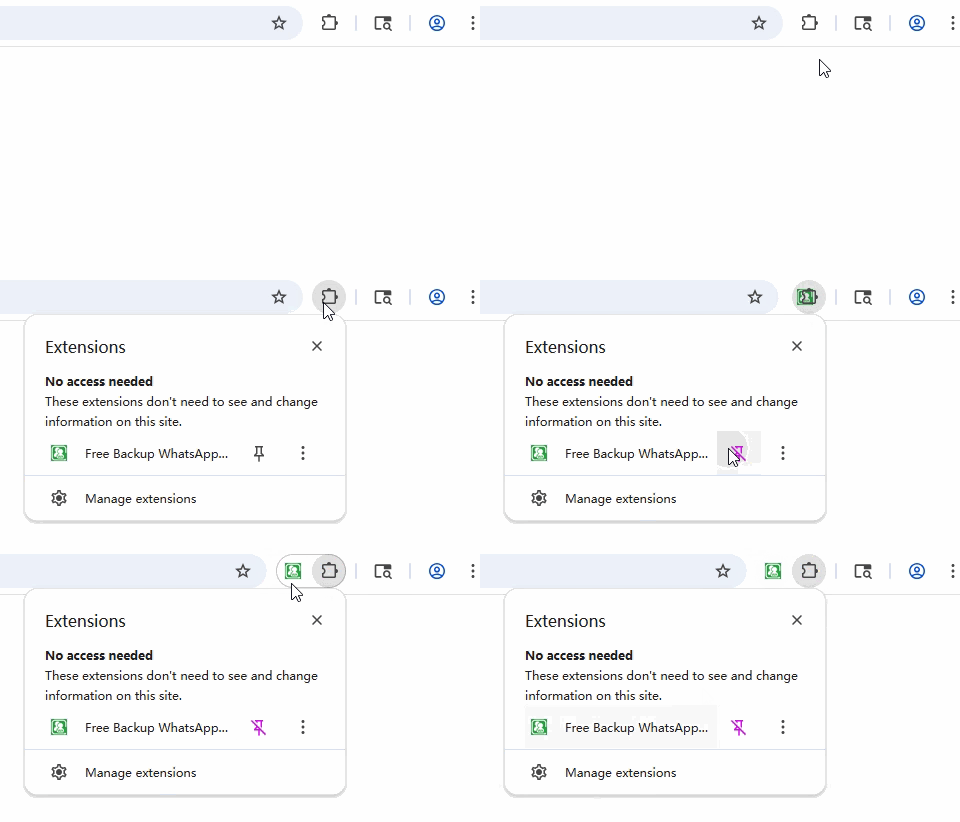
For a shorter screen-by-screen version, use the five-step WhatsApp Contact Export guide.
How to export WhatsApp contacts step by step
1. Open Contact Export in WAContact
Keep WhatsApp Web open, select the WAContact icon in the Chrome toolbar and choose Contact Export. The extension displays the file format, contact source, account type, region and Label settings.
2. Choose Excel, CSV or VCard
Choose the format based on what you plan to do with the exported file:

| Format | Choose it when | Output |
|---|---|---|
Excel (.xlsx) | You want to sort, filter, review or maintain a spreadsheet | Structured columns in a Contacts worksheet |
CSV (.csv) | You need a lightweight, portable table for a compatible tool | Comma-separated structured contact fields |
VCard (.vcf) | You want to import names and phone numbers into a compatible contact application | Contact cards created from the available name and phone number |
Excel and CSV can contain the full contact, country and account-status fields and, with Chat List, recent-chat fields. VCard focuses on names and phone numbers for contact applications that support VCF.
These static previews show how the same anonymous contact data appears in each format:
Excel worksheet
Structured columns make contacts easy to sort, filter and review.
| Public Display Name | Phone Number | Country | Is Business |
|---|---|---|---|
| Northwind Support | +1 202 555 0147 | United States | Yes |
| Alex Morgan | +44 7700 900321 | United Kingdom | No |
CSV tabular data
A portable comma-separated structure for compatible tools.
Public Display Name,Phone Number,Country,Is Business
Northwind Support,+1 202 555 0147,United States,Yes
Alex Morgan,+44 7700 900321,United Kingdom,No
VCard contact cards
The VCF file creates contact cards from available names and phone numbers.
Northwind Support
+1 202 555 0147
VCF contact file
Alex Morgan
+44 7700 900321
VCF contact file
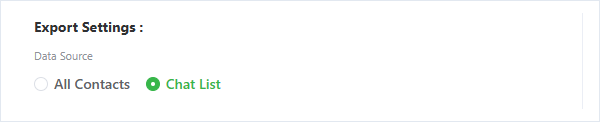
3. Choose All Contacts or Chat List
The source determines which individual contacts WAContact examines and whether Excel or CSV includes recent-chat fields.
| Contact source | Best used for | Excel and CSV result |
|---|---|---|
| All Contacts | Organizing personal-contact records available in WhatsApp Web | Contact identity, country classification and account-status fields |
| Chat List | Organizing individual contacts together with recent conversation context | Contact fields plus Read Status, Last Message, Message Type and Message Time |
Both sources focus on individual contacts and remove duplicate phone numbers during export. Choose All Contacts for contact records; choose Chat List when recent conversation context is relevant.
4. Apply the filters you need
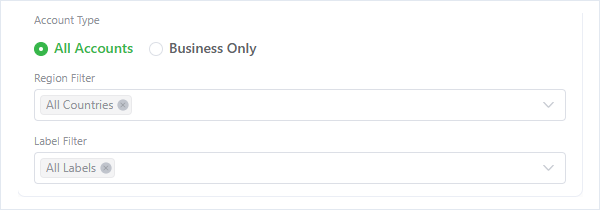
Before creating the file, narrow the contact list by account type, country or region and WhatsApp Label.
Export business contacts only
Set Account Type to Business Only to retain records WhatsApp currently identifies as business accounts. Excel and CSV still include the Is Business field, making the status available for review or sorting after export.
Export contacts by country code
Choose one or more entries under Region Filter. WAContact maps the international calling code to a country or region; for example, a number beginning with +44 is classified under the United Kingdom calling code. This organizes number prefixes and does not reveal a contact's current or exact location.
Export contacts by WhatsApp Label
Select one or more WhatsApp Labels already available in the signed-in account. WAContact applies the selected Labels before creating the file. Labels are export filters rather than a promised standalone column in the output.
Learn how to download contacts by WhatsApp Label, select one or more labels, and troubleshoot missing contacts or empty exports.
5. Export and review the file
Confirm the settings, select Export Contacts and keep WhatsApp Web open while the records are processed.

When the download finishes, check the source, filters, columns and row count. If the file will be imported elsewhere, correct names, remove unnecessary records and confirm phone-number formatting before moving to the next step.
Fields included in Excel and CSV
The standard Excel and CSV export can contain:
| Field | Meaning |
|---|---|
| Country Code | Calling code derived from the international phone number |
| Country | Country or region mapped from that calling code |
| Phone Number | Contact number in international format |
| Public Display Name | Public name currently available to WhatsApp Web |
| Saved Name | Available name stored for the contact |
| Is My Contact | Whether WhatsApp identifies the record as a saved contact |
| Is Business | Whether WhatsApp identifies the account as a business account |
| Is Blocked | Blocked status available for the contact or chat |
When Chat List is selected, the file can also contain Read Status, Last Message, Last Message Type and Last Message Time. A non-text message can have a type and time without a text preview. All Contacts does not add these chat fields.
Practical ways to use a contact export
- Organize international customer resources: An export team can filter authorized customer contacts by calling code and organize follow-up lists by market in Excel.
- Sales and support handoffs: Filter the relevant records before providing them to an authorized team member during an account or service handoff.
- Classify business contacts: Use Business Only to create a focused list of accounts WhatsApp identifies as business accounts.
- Prepare data for a compatible business tool: Arrange CSV columns to match the destination's import requirements; WAContact creates the file but does not claim a direct connection to that system.
- Move contacts to an address book: Import VCard into a mobile or desktop contact application that supports VCF.
- Keep an offline business record: Save a dated contact file for an authorized workflow that follows applicable privacy and platform rules.
For every destination, check the accepted file type, field mapping and phone-number format before importing the data.
Local processing and responsible use
WAContact processes selected contact information in the browser extension workflow and creates the downloaded file locally. Optional diagnostics are handled separately and do not include contact details or exported files. See the WAContact Privacy Policy for the complete disclosure.
Contact files can contain information about other people. Export only data you are authorized to use, protect downloaded files appropriately and follow the privacy, marketing and platform rules that apply to your activity. Free usage limits and paid options are available on the pricing page.
Quick checks before using the result
If the file does not match your expectations, confirm whether All Contacts or Chat List was selected, check whether business, country or Label filters remain active, and allow WhatsApp Web to finish loading before exporting again. Use Chat List for recent-chat fields and Excel or CSV when you need structured fields beyond VCard names and phone numbers.
Frequently asked questions
Which formats does WAContact support, and should I choose Excel, CSV or VCard?
WAContact supports Excel, CSV and VCard. Excel is suited to contact lists that need sorting, filtering and manual review. CSV provides a portable text-based table for compatible tools. VCard creates VCF contact cards from available names and phone numbers for compatible contact applications. Country, account-status and recent-chat fields are primarily available in Excel and CSV.
What is the difference between All Contacts and Chat List, and which fields are included?
All Contacts uses personal-contact records available in WhatsApp Web and is suited to phone numbers, names, country classifications and account status. Chat List uses individual chat contacts and can add Read Status, Last Message, Last Message Type and Last Message Time to Excel and CSV. Both sources remove duplicate phone numbers during export.
Can I filter by business account, country code and WhatsApp Label?
Yes. Set Account Type to Business Only, select countries or regions derived from international calling codes, and choose Labels already available in the signed-in account. The country filter organizes number prefixes and does not provide live or exact location. Selected conditions are applied before WAContact creates the file.
Does WAContact upload contacts or exported files?
Selected contact information is processed locally in the browser extension workflow, and the export file is created locally. Separate optional usage and diagnostic data does not include contact details, chat content, media or exported files. See the Privacy Policy for the exact scope, retention and user controls.
A Clearer Way to Organize WhatsApp Contacts
The right export is not simply the file with the most rows. It is the file that matches the people you need and the work you plan to do next:
- Choose the right format: Use Excel, CSV or VCard for the destination.
- Keep the contact list focused: Narrow the result by contact source, business account, country code or WhatsApp Label.
- Review the result locally: Check the locally created file before using it elsewhere.
When you are ready to organize contact information available in WhatsApp Web, visit WAContact and start with the source and format that fit your task. A focused export is easier to check, protect and use than an unfiltered contact list.
How to Download WhatsApp Label Contacts to Excel or CSV
Export contacts from your WhatsApp labels, combine business and country-code filters, and organize separate files for different labels.
How to Import WhatsApp Contacts into Google Contacts
Move WhatsApp contacts into Google Contacts with VCard or CSV: import VCard directly, or change the CSV name-column header to Name first.